
Factorio doesn’t ease you in — someone opens the game meaning to build “just a small starter base,” and a few hours later there’s a sprawling train network, a six-item-deep research queue, and someone in the group chat asking why the iron belts keep backing up again. If your group has caught the factory-building bug, a dedicated server keeps the world running around the clock instead of depending on one person’s game staying open. Here’s how to set one up using Docker — the same approach we use for our Minecraft and Valheim guides, and the exact method behind our own home Factorio server.
Why Self-Host Factorio Specifically
Factorio has excellent official dedicated server support — Wube Software (the developer) maintains a lightweight, clean headless server binary, and the community-maintained Docker image built around it makes setup genuinely simple. Compared to some other games, there’s very little friction here.
What You’ll Need
- A dedicated machine — a mini PC is plenty; see our hardware guide if you haven’t picked one yet
- Modest RAM, but strong single-thread CPU performance. Factorio’s RAM needs are genuinely light even for large factories — the real bottleneck is CPU. Late-game “megabases” can drop your server’s simulation rate (UPS, Updates Per Second) regardless of how much RAM you throw at it, simply because of the sheer number of entities being simulated
- Docker installed on your machine
Step 1: Run the Factorio Server Container
The community-maintained factoriotools/factorio image is the standard, well-documented choice for Dockerized Factorio hosting.
docker run -d \
  --name factorio-server \
  -p 34197:34197/udp \
  -p 27015:27015/tcp \
  -v factorio-data:/factorio \
  --restart unless-stopped \
  factoriotools/factorio
What this does:
-p 34197:34197/udp— the main game port-p 27015:27015/tcp— RCON port, used for remote server administration/commands-v factorio-data:/factorio— persists your save files, mods, and configuration outside the container--restart unless-stopped— automatically restarts the server if it crashes (see our 24/7 uptime guide for more on this)
On first run, this generates a new world and creates configuration files inside your mounted volume.
Step 2: Confirm It’s Running
Check the logs to watch startup progress:
docker logs -f factorio-server
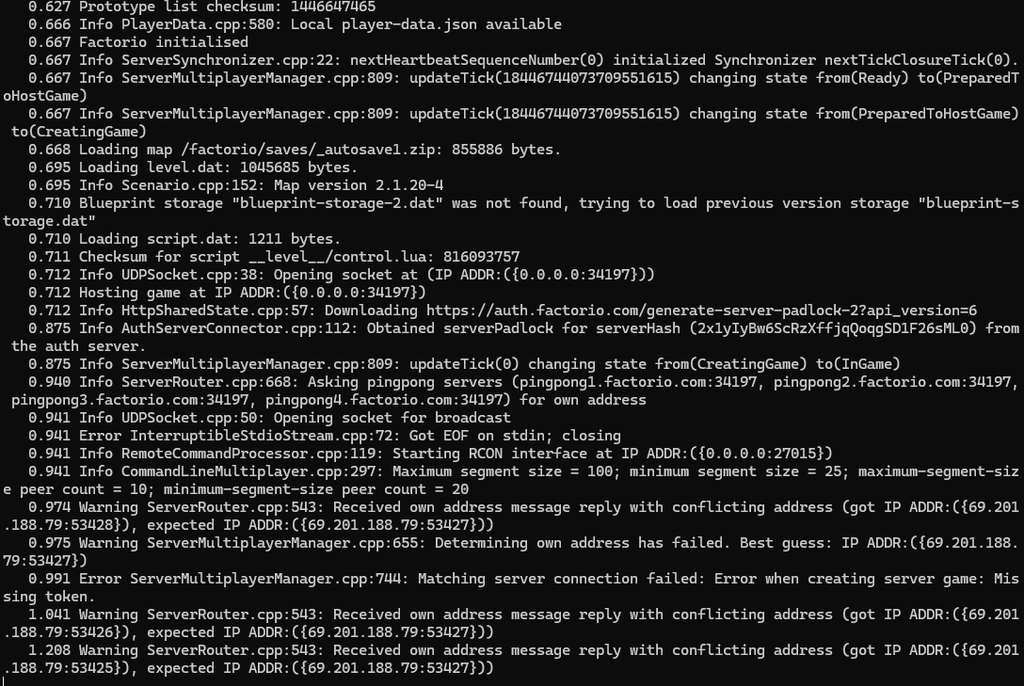
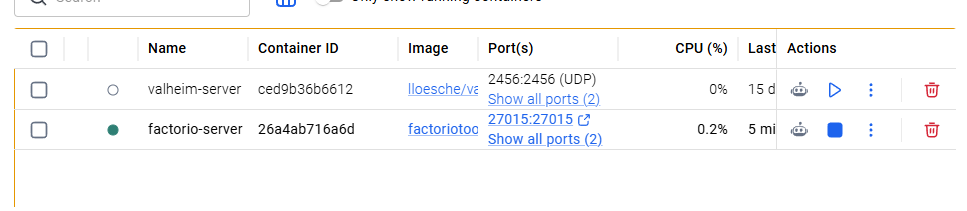
Look for a line like “Hosting game at…” — once you see that, your server is live on your local network.
Step 3: Port Forward for Outside Access
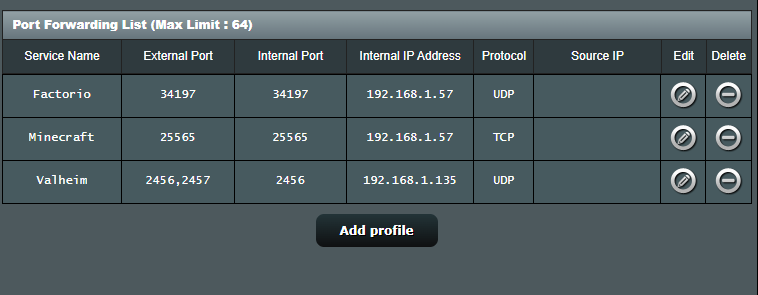
Same process as our other guides — see our full port forwarding guide if you need the detailed walkthrough. The short version:
- Log into your router’s admin panel
- Forward UDP port 34197 to your server machine’s static local IP
- Optionally forward TCP port 27015 as well if you want remote RCON access from outside your network
Space Age DLC
If you own the Space Age expansion, the image includes built-in handling for it through environment variables — you can enable or disable Space Age content and related mods without manually editing config files. Check the image’s documentation for the current variable names, since DLC handling has evolved as the expansion has matured.
One important note if you’re managing DLC or mod versions carefully: Factorio’s stable and experimental branches are separate, and saves upgraded to a newer major version generally can’t be downgraded back. If your group relies on a specific mod stack, avoid jumping to a new version just because it’s available — back up your save first, and confirm your mods support the version you’re moving to.
Adding Mods
Factorio’s mod ecosystem is deep, and the game itself makes installing mods straightforward. To use mods with your Dockerized server, you’ll generally need to supply your Factorio account username and a mod-download token (available from your factorio.com profile) as environment variables, which lets the container fetch mods automatically on startup.
Common First-Time Issues
- Friends can’t connect: same troubleshooting steps as our other games apply — check port forwarding, your OS firewall, and confirm you’re sharing your public IP, not your local network IP. See our full troubleshooting checklist for the complete rundown.
- Server performance dropping over time: this is usually UPS-related, not a bug — as your factory grows, the simulation itself gets heavier. There’s no hardware fix for this beyond a genuinely strong single-thread CPU; it’s an inherent trade-off of how large your base has grown.
- Mods not loading: double-check your Factorio account token is correctly set as an environment variable, and that
UPDATE_MODS_ON_START(or the equivalent current variable) is enabled if you want mods refreshed automatically. - “Matching server connection failed” / conflicting address warnings in the logs: these typically relate to Factorio’s optional public server listing and authentication service, not your actual server process. Check
docker psto confirm the container is still running — if it shows as healthy, your server is likely still reachable directly via IP even if these warnings appear in the log.
Getting Started
If you haven’t picked hardware yet, our mini PC hosting guide covers what to look for. And if you’re weighing self-hosting against other options, our comparison of every method to play with friends covers the broader picture, even though it’s written with Minecraft in mind — the same trade-offs largely apply here too.